
The ui.draw component covers the long tail no primitive does: gauges, dials, custom graphs, clock faces. Its painter is an ordinary Lua function that records operations on the canvas it is handed; the view replays them. The painter runs when a present or push carries the node’s data field, never per frame, so an idle canvas costs nothing.
ui.draw { data = f.frac, w = 120, h = 60, painter = function(g: painter_t, d: { frac: number }, w: number, h: number) ... end }d is the whole payload being pushed, so type it with the fields you read. w and h are the node’s size in design pixels, from at = { x, y, w, h } inside a frame or the w and h props (default 64 by 64). Coordinates run from the top-left corner; the canvas clips at its edges. A painter may record 2,048 operations per run; extra ones are dropped.
The painter also runs for the seed a w:preview{...} supplies and for preview.luau, so a hand-painted face looks the same in the Layout gallery and on the Workshop item as it does live.
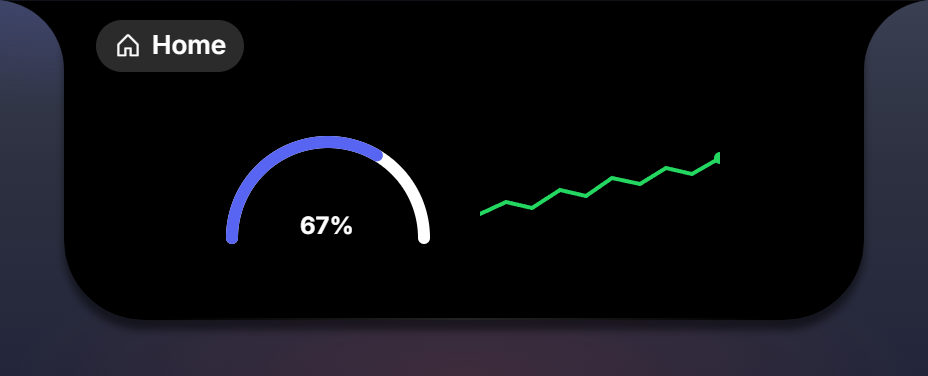
--!strict
local function draw_gauge(g: painter_t, d: { frac: number, label: string }, w: number, h: number)
  local cx, cy, r = w / 2, h - 6, h - 12
  g.arc(cx, cy, r, math.pi, 2 * math.pi, { stroke = ui.color.well, width = 6, cap = "round" })
  g.arc(cx, cy, r, math.pi, math.pi + math.pi * d.frac, { stroke = ui.color.accent, width = 6, cap = "round" })
  g.text(cx - 14, cy - 2, d.label, { fill = ui.color.primary, size = 12 })
end
The operations
| Operation | Draws |
|---|---|
g.line(x1, y1, x2, y2, style?) | a segment |
g.rect(x, y, w, h, style?) | an axis-aligned rectangle from its top-left corner |
g.circle(cx, cy, r, style?) | a full circle |
g.arc(cx, cy, r, from, to, style?) | an arc from angle from to to, in radians, clockwise, 0 at three o’clock. A half circle across the top runs from math.pi to 2 * math.pi |
g.path(points, style?) | a polyline through { { x, y }, { x, y }, ... }; fill closes and fills it |
g.text(x, y, text, style?) | a text run with its baseline at y, starting at x, bold and left-aligned |
The style table
Every operation takes an optional final table. All keys are optional.
| Key | Applies to | Meaning |
|---|---|---|
fill | rect, circle, arc, path, text | fill colour |
stroke | line, rect, circle, arc, path | stroke colour |
width | stroked ops | stroke width in px, default 1 |
cap | stroked ops | "butt" (default), "round" or "square" |
size | text | font size in px, default 13 |
Colours are the same values a tree takes: ui.color.* roles, "@palette" names, or hex literals. They resolve through the active theme.
A clock face
The worldclock sample paints the analog face on its page card:
--!strict
-- displays.luau
export type hands_t = { h: number, m: number }
export type fields_t = {
  zone: field_ref_t<string>, time: field_ref_t<string>,
  hands: record_ref_t<{ h: field_ref_t<number>, m: field_ref_t<number> }>,
}

local function draw_face(g: painter_t, d: { hands: hands_t }, w: number, h: number)
  local cx, cy, r = w / 2, h / 2, w / 2 - 2
  g.circle(cx, cy, r, { fill = ui.bg.raised, stroke = "track", width = 1 })
  local ha = ((d.hands.h + d.hands.m / 60) / 12) * 2 * math.pi
  local ma = (d.hands.m / 60) * 2 * math.pi
  g.line(cx, cy, cx + r * 0.5 * math.sin(ha), cy - r * 0.5 * math.cos(ha), { stroke = ui.color.primary, width = 3, cap = "round" })
  g.line(cx, cy, cx + r * 0.78 * math.sin(ma), cy - r * 0.78 * math.cos(ma), { stroke = "@brand", width = 2, cap = "round" })
  g.circle(cx, cy, 2, { fill = ui.color.primary })
end

return {
  card = function(f: fields_t): node_t
    return ui.frame {
      ui.draw { at = { 8, 14, 64, 64 }, data = f.hands, painter = draw_face },
      ui.column { at = { 88, 18 }, gap = ui.gap.s,
        ui.text { text = f.zone, role = ui.role.sub },
        ui.text { text = f.time, role = ui.role.big, color = "@brand" },
      },
    }
  end,
}
with hands = field.record { h = field.number(0), m = field.number(0) } in the widget’s schema.
Types
export type paint_t = (g: painter_t, data: any, w: number, h: number) -> ()A painter.
export type painter_t = {
	line: (x1: number, y1: number, x2: number, y2: number, style: paint_style_t?) -> (),
	rect: (x: number, y: number, w: number, h: number, style: paint_style_t?) -> (),
	circle: (cx: number, cy: number, r: number, style: paint_style_t?) -> (),
	arc: (cx: number, cy: number, r: number, from: number, to: number, style: paint_style_t?) -> (),
	path: (points: { { number } }, style: paint_style_t?) -> (),
	text: (x: number, y: number, text: string, style: paint_style_t?) -> (),
}
export type paint_style_t = { fill: color_t?, stroke: color_t?, width: number?, cap: ("butt" | "round" | "square")?, size: number?, weight: number? }
The canvas and the style table.
export type draw_props_t = node_props_t & { data: field_ref_t<any>?, painter: paint_t }The props of ui.draw.