
A display is a function of the widget’s field refs that returns a tree of ui.* builders. It is structure, not logic: no loops at runtime, no styling language, and the only functions in it are input handlers and a ui.draw painter. Perch validates it once at load, builds it once when the widget mounts, and afterwards updates only the nodes whose bound field changed.
--!strict
-- displays.luau
export type fields_t = { label: field_ref_t<string>, frac: field_ref_t<number> }

local function card(f: fields_t): node_t
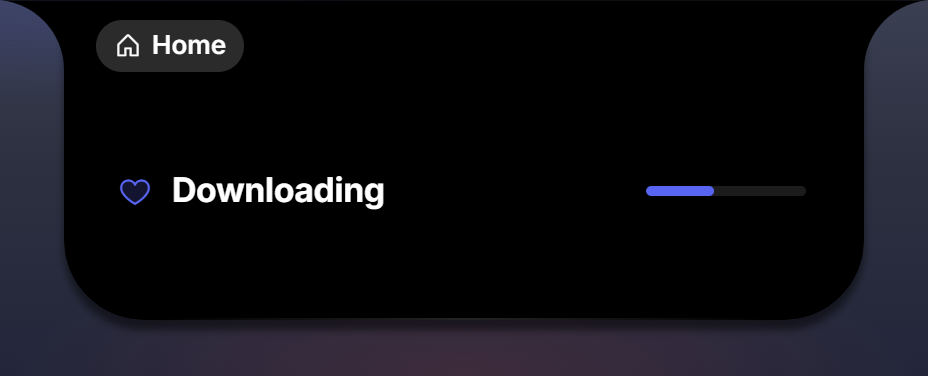
  return ui.row { gap = 10, align = ui.align.center, pad = { 0, 14, 0, 12 },
    ui.icon { glyph = ui.glyph.heart, set = "duotone", size = ui.size.m, color = ui.color.accent },
    ui.text { text = f.label, role = ui.role.title, flex = 1 },
    ui.bar { value = f.frac, height = 5, w = 80, flex = 0, track = ui.color.well, fill = ui.color.accent },
  }
end

return { card = card }
w:place(surface.page, displays.card) calls the function once with the widget’s refs.
Props and children
Every builder takes one table. Named keys are props; positional entries are the children, in order. Containers take children; leaves do not, and passing one raises ui.text takes no children.
ui.column { gap = ui.gap.s, align = ui.align.center,   -- props
  ui.text { text = "Top" },                         -- child 1
  ui.text { text = "Bottom" },                      -- child 2
}
ui.label "players online" and ui.value "09:41" are shorthands for a label-role and a value-role text. Enums are tables whose values are the wire strings (ui.role.h2, ui.color.accent_warm, ui.align.center), so they complete in the editor; ui.align.finish is spelled so because end is a keyword. Props are validated at construction, so a typo raises in your file on your line: displays.luau:12: ui.text: unknown prop 'colour'.
Components lists every builder and prop.
Your Luau pushes facts; the tree declares structure
Compute view-ready values and push them: a number with separators, a “3m ago” label, an angle in degrees for a clock hand, a CSS gradient for a monogram. The tree binds them and never computes at render time.
w:push({ label = "Downloading", frac = 0.42, hand = 127 })w:push merges: keys you send replace the previous value, keys you omit keep theirs, and bound nodes repaint only when their value changed. Push only what moved:
w:push({ pos_frac = pos / dur }) -- twice a second: one numberEvery push is validated against the widget’s fields: w:push({ posfrac = 0.5 }) raises widget 'media': unknown field 'posfrac' (declare it in fields = { … }).
Binding
A data prop takes a literal, a field ref, or a function of the data; see Fields. What the bound value means depends on the component: a string for ui.text, a URL for ui.image, a fraction 0..1 for ui.bar and ui.ring, an array of levels for ui.visualizer, points or a { points, up } record for ui.sparkline, a list for ui.list and ui.grid, a record or an epoch for ui.ticker.
color and bg take a ref for a colour Luau computed: declare it field.color() and push a #hex, an hsl() value, or the monogram gradient form. rotate takes a field.number() ref of degrees.
ui.text has three small formatters so the common cases need no Luau: prefix and suffix wrap the value, map = { key = "shown" } translates it, max truncates with an ellipsis.
ui.text { text = f.temp, suffix = "°" }
ui.text { text = f.phase, map = { work = "Focus", rest = "Break" } }
Repeaters
ui.list and ui.grid build one subtree per element of a field.list, from an item function that receives the element’s refs:
export type face_refs_t = { avatar: field_ref_t<string>, initial: field_ref_t<string> }

ui.list { items = f.faces, dir = ui.dir.row, gap = 6, max = 8,
  item = function(it: face_refs_t): node_t
    return ui.image { src = it.avatar, w = 28, h = 28, radius = 999,
      fallback = ui.text { text = it.initial, role = ui.role.value } }
  end }
with faces = field.list { avatar = field.image(), initial = field.string("") } in the schema. max caps the count (16 for ui.list, 64 for ui.grid). key = f.faces.item.name keeps existing subtrees when the array changes so nothing re-enters.
Conditions and style rules
when gates a node on a boolean ref or a condition; style flips looks while a condition holds. The full method list is on Fields.
ui.icon { glyph = ui.glyph.pause, when = f.paused }
ui.text { text = "Live", when = f.state:eq("live") }
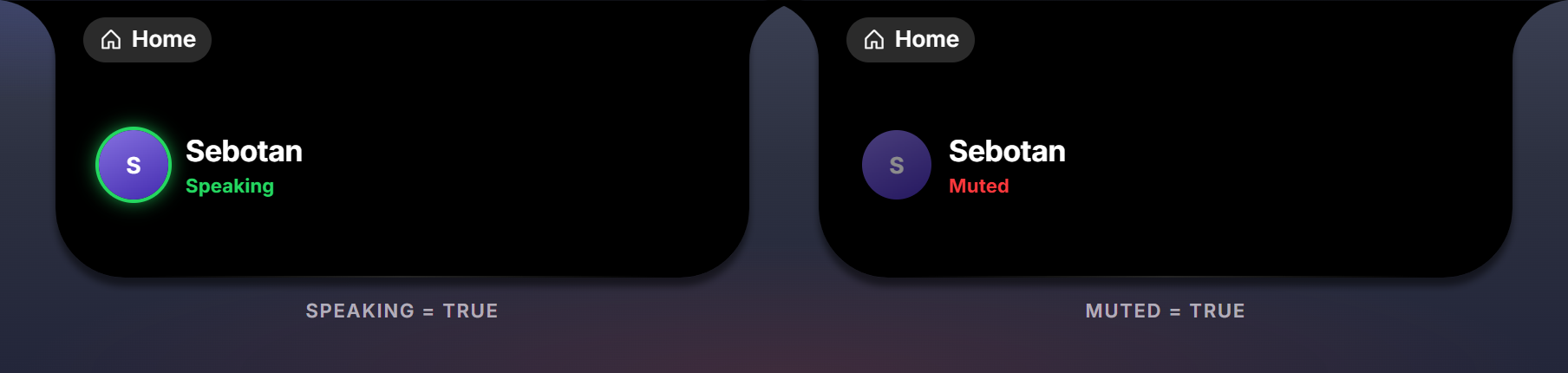
ui.image { src = f.avatar, radius = 999,
  style = {
    f.speaking:is_true():set { ring = { 2, ui.color.live }, glow = { 12, ui.color.live } },
    f.muted:is_true():set { opacity = 0.5 },
  } }
Inputs
Any node can take input: give it the function, and Perch hands the event back with an input_context_t. The props, the context and the hover options are on Input.
ui.button { glyph = ui.glyph.play, on_click = function(ctx: input_context_t) toggle() end }
ui.column { on_scroll = function(ctx: input_context_t) perch.audio.volume.set(level + (ctx.steps or 0) * 2) end, ... }
ui.bar { value = f.pos_frac, seek = true, knob = true, on_seek = function(ctx: input_context_t) seek_to(ctx.frac or 0) end }
Look a verb up at click time (on_click = function() act.play_pause() end) rather than capturing it when the tree is built, because the display function usually runs before the verbs exist.
Editable fields
A ui.field node is a text input. value = f.text seeds it; edits arrive on its on_change(text, ctx), debounced 800 ms and flushed on blur, with the widget’s data updated before the call. A push never overwrites a field the user is typing in.
ui.field { value = f.text, multiline = true, placeholder = "Write something down...",
  on_change = function(text: string, ctx: input_context_t) perch.storage.set("text", text) end }
The draw canvas
For a gauge, a graph or a clock face, a ui.draw node runs a Luau painter whenever its data field is pushed. See Draw.
Live time without Luau
ui.ticker renders a clock, an elapsed time or a countdown on the view side from a clock_record_t or a field.time_ms() epoch; ui.gauge is the clock’s live seconds scale. Push the record once and the text ticks by itself.
Seeing the layout
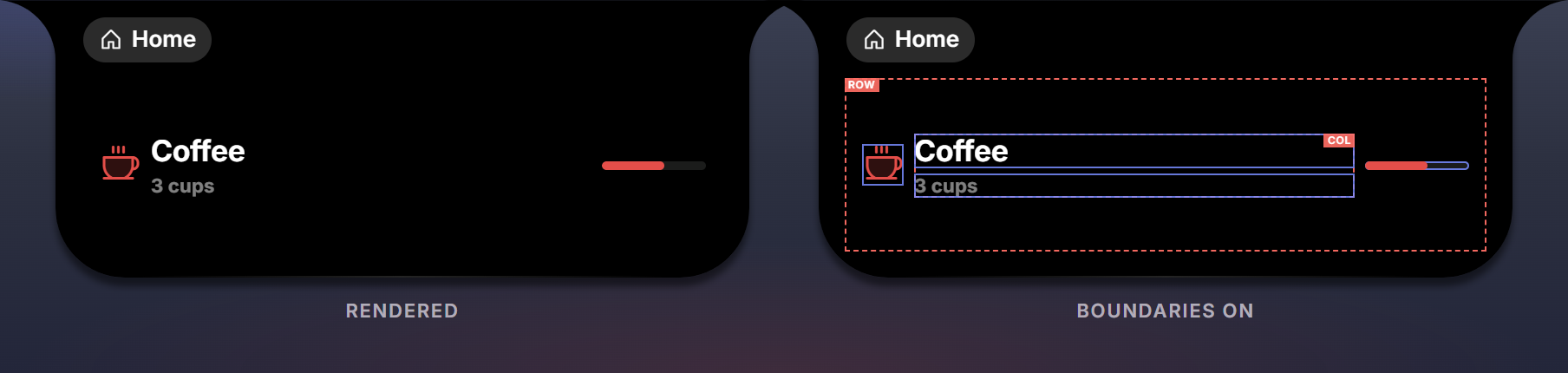
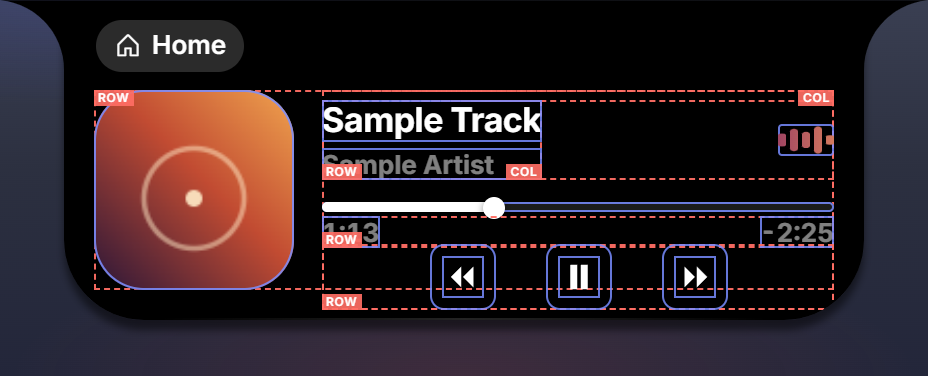
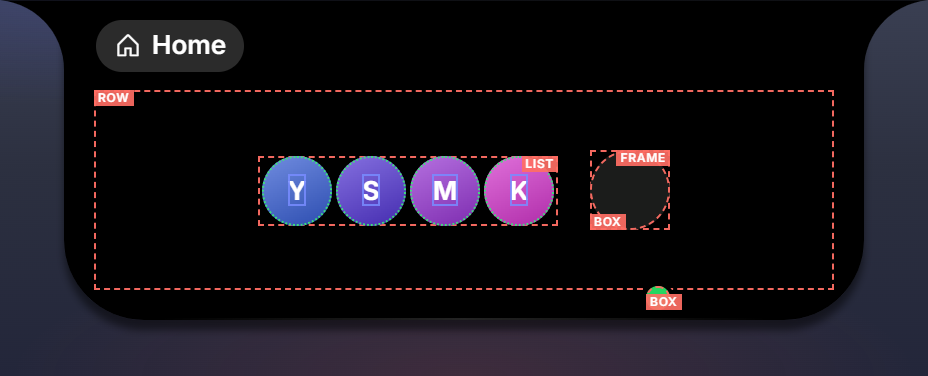
Layout is flexbox: ui.row and ui.column lay children out along one axis, flex decides who grows, w and h pin sizes, pad and gap add space, ui.frame positions children absolutely with at. When a card does not come out the way you pictured it, press Boundaries in Perch Studio’s preview: containers are outlined dashed red with their type label, leaves solid blue, repeater items dotted green.
Payload rules
- Every key is declared in
fields. A Luau array becomes a JSON array; an empty table becomes an empty array, so{}for a list is fine. - Keep payloads small and flat; the whole payload is kept per widget and merged on every push.
- Strings are shown as-is; the renderer never interprets HTML.
- Image values may be
https://URLs,file://paths Perch gave you, ordata:URIs.