
A mod’s settings page is declared in Luau with perch.settings.declare, passing a table keyed by setting name whose values are settings.* constructors. Perch renders the rows under Settings, Features, stores the values, and hands them to perch.on_configure before perch.on_start and on every change. The call returns the same keys as row objects, which is how a mod drives the rows that show or act instead of storing.
--!strict
type settings_t = { unit: string?, trend: boolean?, games: { { appid: string? } }? }

local rows = perch.settings.declare {
  __order = { "unit", "trend", "games" },
  unit = settings.choice("Unit", { options = { "metric", "imperial" }, default = "metric" }),
  trend = settings.toggle("Show the trend line", { default = true }),
  games = settings.list("Games", { add_label = "Add game", item = { appid = settings.game("Game") } }),
}

perch.on_configure:connect(function(s: settings_t)
  -- s.unit == "metric", s.trend == true, s.games == { { appid = "730" }, ... }
end)
Declare at the top of the entry file so the rows exist before the boot on_configure. Declaring again replaces the row set; stored values survive.
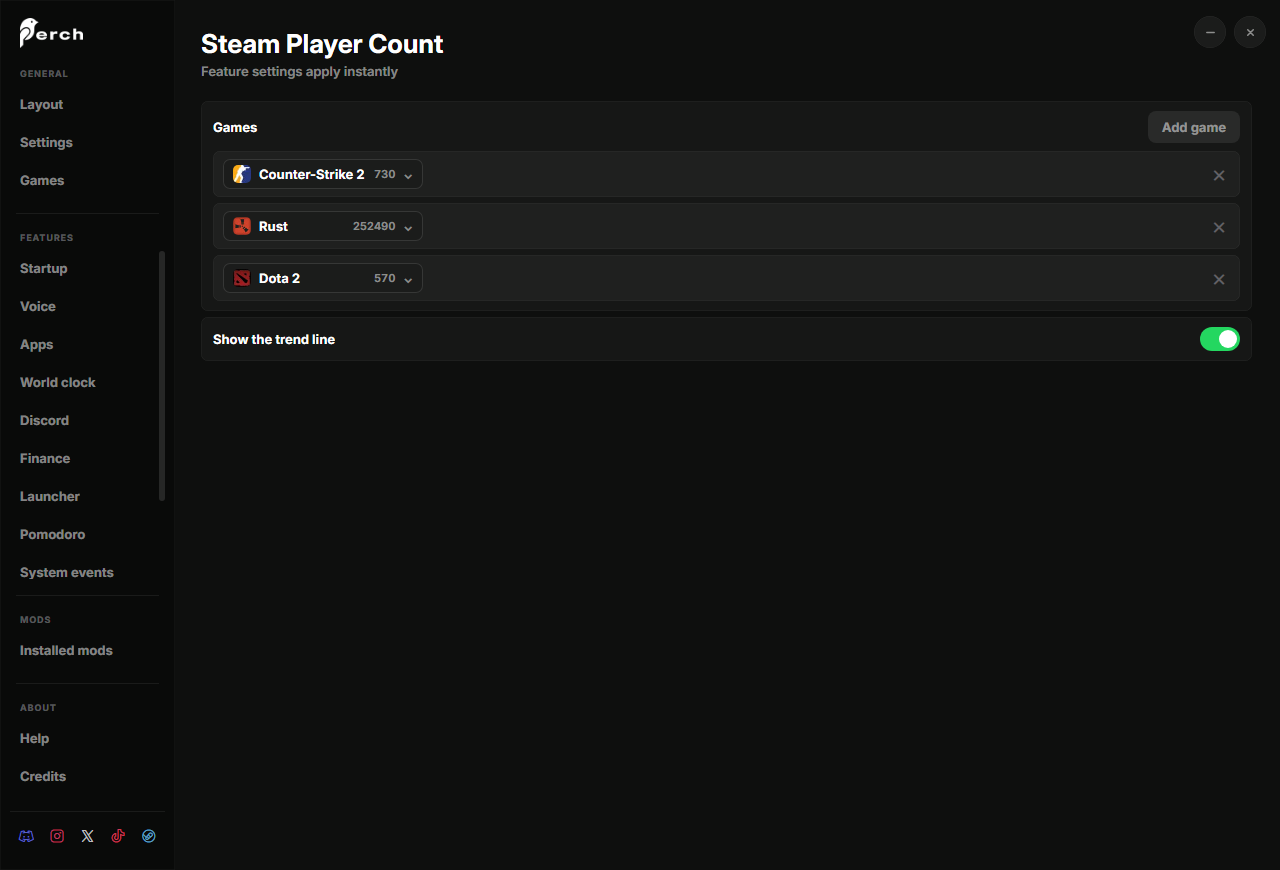
perch.settings.declare
perch.settings.declare<R>(rows: R): RThe table key is the setting key: the name the value arrives under in on_configure and the storage key. A Luau table has no order, so pass __order = { "key", ... } to fix the page order; keys it omits are appended after the ones it names, and a key that was never declared raises perch.settings.declare: __order names '<key>', which is not a declared row.
Every constructor is settings.<kind>(label, opts?). A missing label raises (settings.toggle: label (arg 1) must be a non-empty string); a key that is not an identifier, a value that is not a row, or an option the kind does not have raise at the call too.
Options every kind accepts:
| Option | Meaning |
|---|---|
default | the value before the user touches the row. Set it for anything but a toggle |
inline_with_previous | render this control in the previous row (a text field followed by its choice chips); not allowed after a note |
Rows that store a value
| Constructor | Value in on_configure | Notes |
|---|---|---|
settings.toggle(label, opts?) | boolean | |
settings.slider(label, opts) | number | min, max, step (default 0.01). Fires while the user drags, so keep the handler light |
settings.choice(label, opts) | string, one of options | rendered as chips |
settings.text(label, opts?) | string, up to 1,000 characters | placeholder; committed on Enter or blur |
settings.game(label, opts?) | the appid as a string of digits, or "" | a picker over the installed library and Steam store search |
settings.launch(label, opts?) | a launch_target_t, all fields "" when nothing is picked | a website, a Steam game or an installed app, with its icon resolved at pick time; options restricts the types |
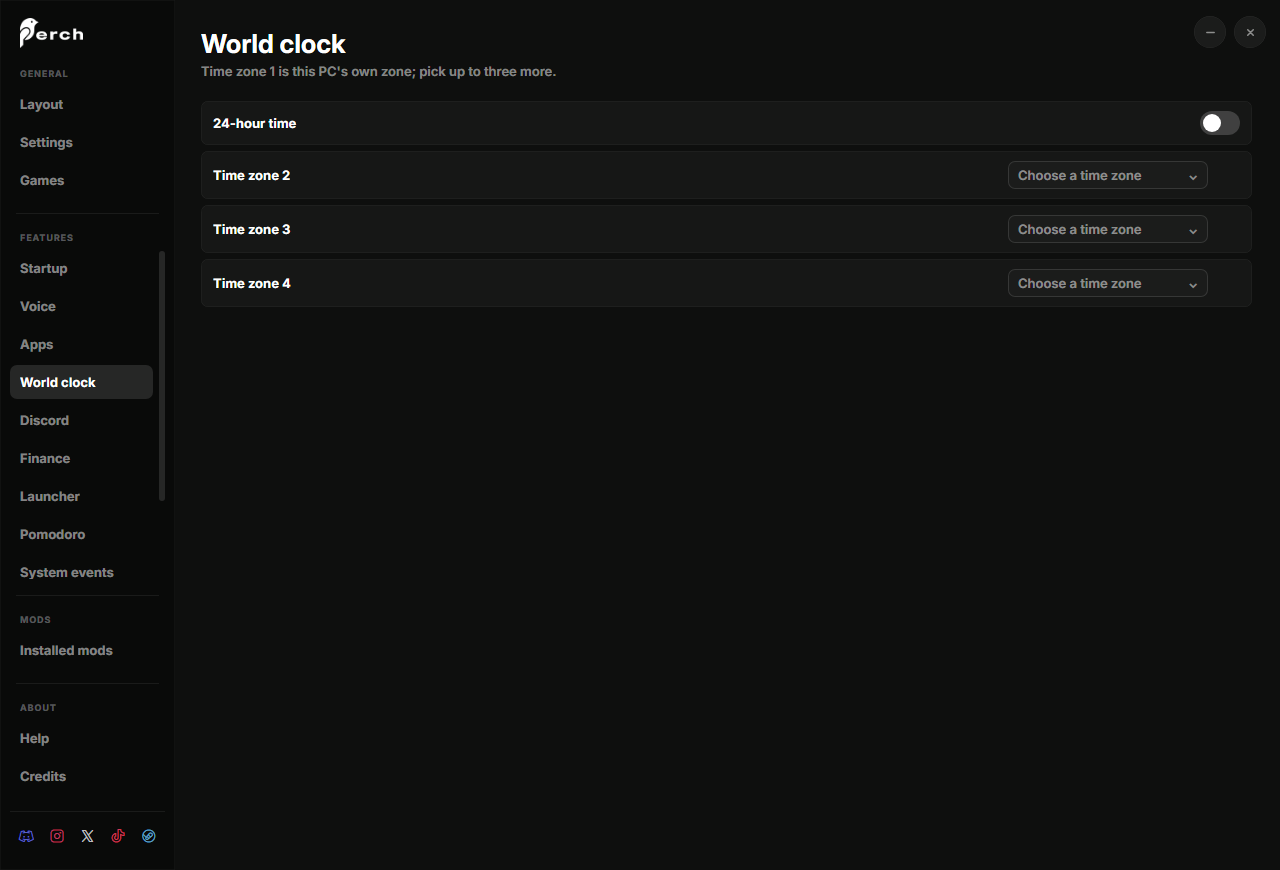
settings.timezone(label, opts?) | an IANA zone name, or "" | a searchable list of the OS zone database |
settings.ticker(label, opts?) | a symbol ("AAPL", "^GDAXI", "crypto:bitcoin"), or "" | Yahoo Finance symbols and CoinGecko coins |
settings.list(label, opts) | an array of row tables, keyed like item | see below |
work_min = settings.slider("Work minutes", { min = 15, max = 60, step = 5, default = 25 }),
unit = settings.choice("Unit", { options = { "metric", "imperial" }, default = "metric" }),
name = settings.text("Display name", { default = "", placeholder = "Your name" }),
appid = settings.game("Game"),
target = settings.launch("Open", { options = { "steam", "app" } }),
zone = settings.timezone("Zone"),
symbol = settings.ticker("Symbol", { default = "AAPL" }),
Pair settings.game with perch.steam, settings.launch with perch.open, settings.timezone with perch.time.
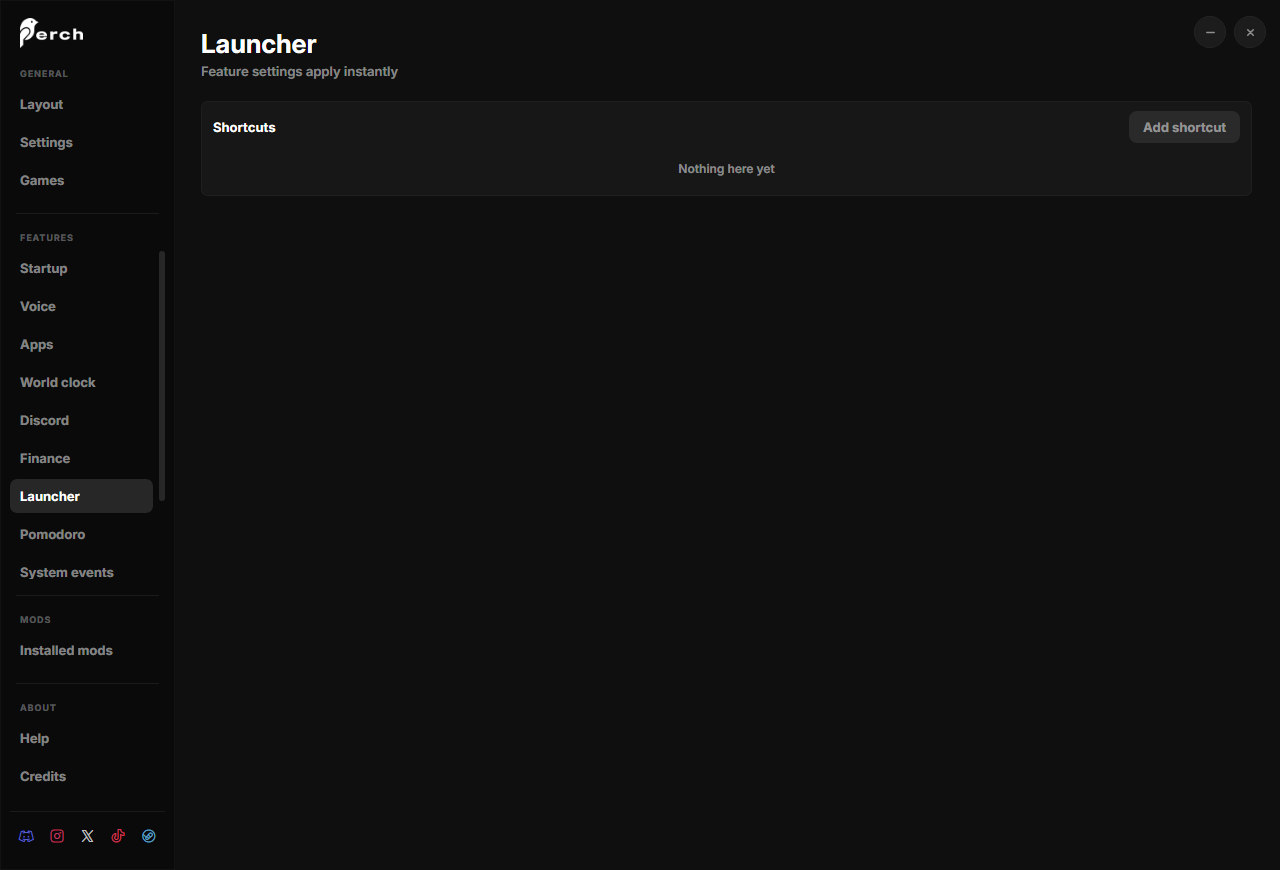
settings.list
A repeating group of rows with an Add button and per-row remove. This is how “a dynamic number of things” is configured: one game per row, one shortcut per row.
| Option | Meaning |
|---|---|
item | a table keyed like declare itself, describing one row; any kind except a list or a button |
add_label | the Add button’s text, default "Add" |
max | the row cap, 1 to 200, default 64 |
slots = settings.list("Shortcuts", { add_label = "Add shortcut", max = 12, item = { target = settings.launch("Open") } }),type settings_t = { slots: { { target: launch_target_t? } }? }
perch.on_configure:connect(function(s: settings_t)
for i, row in ipairs(s.slots or {}) do
-- row.target.type, row.target.ref, row.target.label, row.target.icon
end
end)A list whose single item is a settings.game or settings.launch row makes Add open the picker directly. Diff the array in perch.on_configure to add and remove widgets, as in Widgets.
Rows that show or act
These carry no value and never appear in on_configure. The mod drives them through the row objects declare returns.
| Constructor | What it is | Verbs |
|---|---|---|
settings.status(label) | a live chip: text and a green or red state | row:set(text, ok) |
settings.button(label, text, on_click) | a button that runs a function | row:set_text(text), row:set_enabled(bool) |
settings.note(label, opts) | a full-width instruction block: text (each \n a new line), links ({ label, url } chips that open the browser, or { label, copy } clipboard chips), step (a numbered card), image (a package-relative screenshot, at most 600 KB) |
Every row answers row:set_visible(bool). Row state is kept by Perch and merged into the settings page, so a page opened later shows what the mod last set.
The builtin Discord page is the reference: a status chip, numbered step cards with the Application ID field between them, and Connect and Disconnect buttons that swap on the link state.
--!strict
local rows = perch.settings.declare {
  __order = { "link", "step1", "app_id", "step2", "connect", "disconnect" },
  link = settings.status("Discord account"),
  step1 = settings.note("Create your Discord app", {
    step = 1, image = "guide/new-app.png",
    text = "Open the developer portal, click New Application and create it.",
    links = { { label = "Open the developer portal", url = "https://discord.com/developers/applications" } },
  }),
  app_id = settings.text("Application ID", { default = "" }),
  step2 = settings.note("Let Perch sign in", {
    step = 2,
    text = "On the OAuth2 page add this redirect and save.",
    links = { { label = "Copy http://127.0.0.1", copy = "http://127.0.0.1" } },
  }),
  connect = settings.button("Connection", "Connect", function() perch.discord.connect() end),
  disconnect = settings.button("Sign out", "Disconnect", function() perch.discord.disconnect() end),
}

local function sync_rows(connected: boolean)
  rows.link:set(if connected then "Connected" else "Not connected", connected)
  rows.step1:set_visible(not connected)
  rows.step2:set_visible(not connected)
  rows.connect:set_visible(not connected)
  rows.disconnect:set_visible(connected)
end

perch.on_start:connect(function() sync_rows(perch.discord.read().connected) end)
perch.discord.on_status:connect(function(s: discord_state_t) sync_rows(s.connected) end)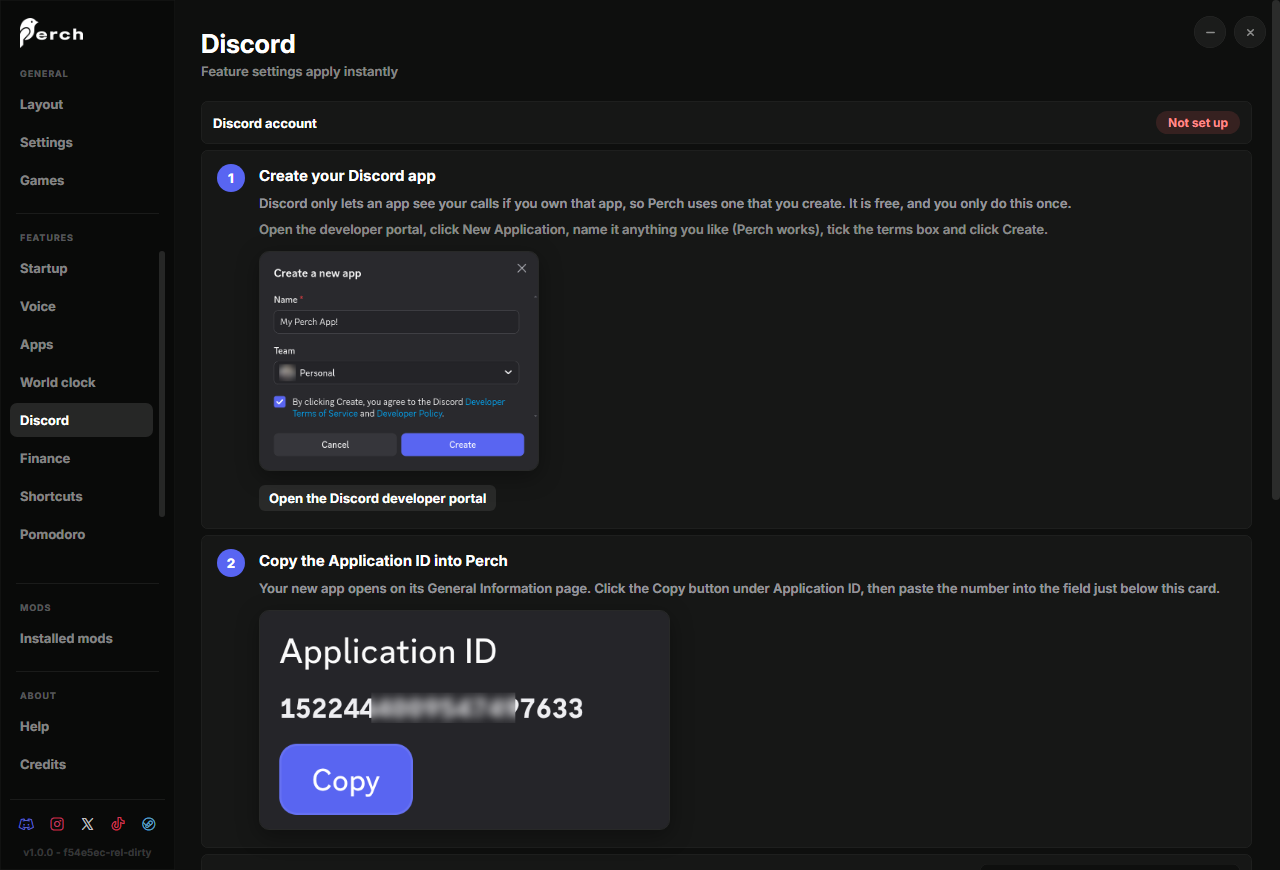
Validation and storage
Perch validates every value the settings window tries to store against the row’s kind: a toggle must be a boolean, a slider a number within its range, a choice one of its options, text at most 1,000 characters, a game id digits only, a URL https://, a list an array within max whose rows all validate. A value that fails is not stored, so on_configure only ever sees well-formed data. Values live under the mod’s own config subtree; uninstalling a mod does not delete them.
Types
export type row_t = { set_visible: (self: row_t, visible: boolean) -> row_t }
export type toggle_row_t = row_t
export type slider_row_t = row_t
export type choice_row_t = row_t
export type text_row_t = row_t
export type game_row_t = row_t
export type launch_row_t = row_t
export type timezone_row_t = row_t
export type ticker_row_t = row_t
export type list_row_t = row_t
export type note_row_t = row_t
export type status_row_t = { set_visible: (self: status_row_t, visible: boolean) -> status_row_t, set: (self: status_row_t, text: string, ok: boolean) -> status_row_t }
export type button_row_t = { set_visible: (self: button_row_t, visible: boolean) -> button_row_t, set_text: (self: button_row_t, text: string) -> button_row_t, set_enabled: (self: button_row_t, enabled: boolean) -> button_row_t }
The row objects declare returns, one type per kind.
export type row_options_t = { inline_with_previous: boolean? }
export type toggle_options_t = row_options_t & { default: boolean? }
export type slider_options_t = row_options_t & { min: number, max: number, step: number?, default: number? }
export type choice_options_t = row_options_t & { options: { string }, default: string? }
export type text_options_t = row_options_t & { default: string?, placeholder: string? }
export type launch_options_t = row_options_t & { options: { string }? }
export type ticker_options_t = row_options_t & { default: string? }
export type list_options_t = row_options_t & { item: { [string]: row_t }, add_label: string?, max: number? }
export type note_options_t = row_options_t & { text: string, links: { link_t }?, step: number?, image: string? }
export type link_t = { label: string, url: string } | { label: string, copy: string }
The option tables, and a note’s chip.
export type launch_target_t = { type: "steam" | "url" | "app", ref: string, label: string, icon: string }What a settings.launch row stores; see Open.
declare settings: {
	toggle: (label: string, opts: toggle_options_t?) -> toggle_row_t,
	slider: (label: string, opts: slider_options_t) -> slider_row_t,
	choice: (label: string, opts: choice_options_t) -> choice_row_t,
	text: (label: string, opts: text_options_t?) -> text_row_t,
	game: (label: string, opts: row_options_t?) -> game_row_t,
	launch: (label: string, opts: launch_options_t?) -> launch_row_t,
	timezone: (label: string, opts: row_options_t?) -> timezone_row_t,
	ticker: (label: string, opts: ticker_options_t?) -> ticker_row_t,
	list: (label: string, opts: list_options_t) -> list_row_t,
	status: (label: string) -> status_row_t,
	button: (label: string, text: string, on_click: () -> ()) -> button_row_t,
	note: (label: string, opts: note_options_t) -> note_row_t,
}